
Claims Fingerprint™
Every Practice Has a Claims Fingerprint. Discover Yours.
Upload your ERA. We'll analyze up to 1,000 claims to uncover the patterns behind your denials, adjustments, and lost revenue.
$99 one-time
30 days of access. No subscription. Full $99 credited toward your first month if you later upgrade to ClaimsRevenue.
Get Your Claims Fingerprint $99 See what you get → 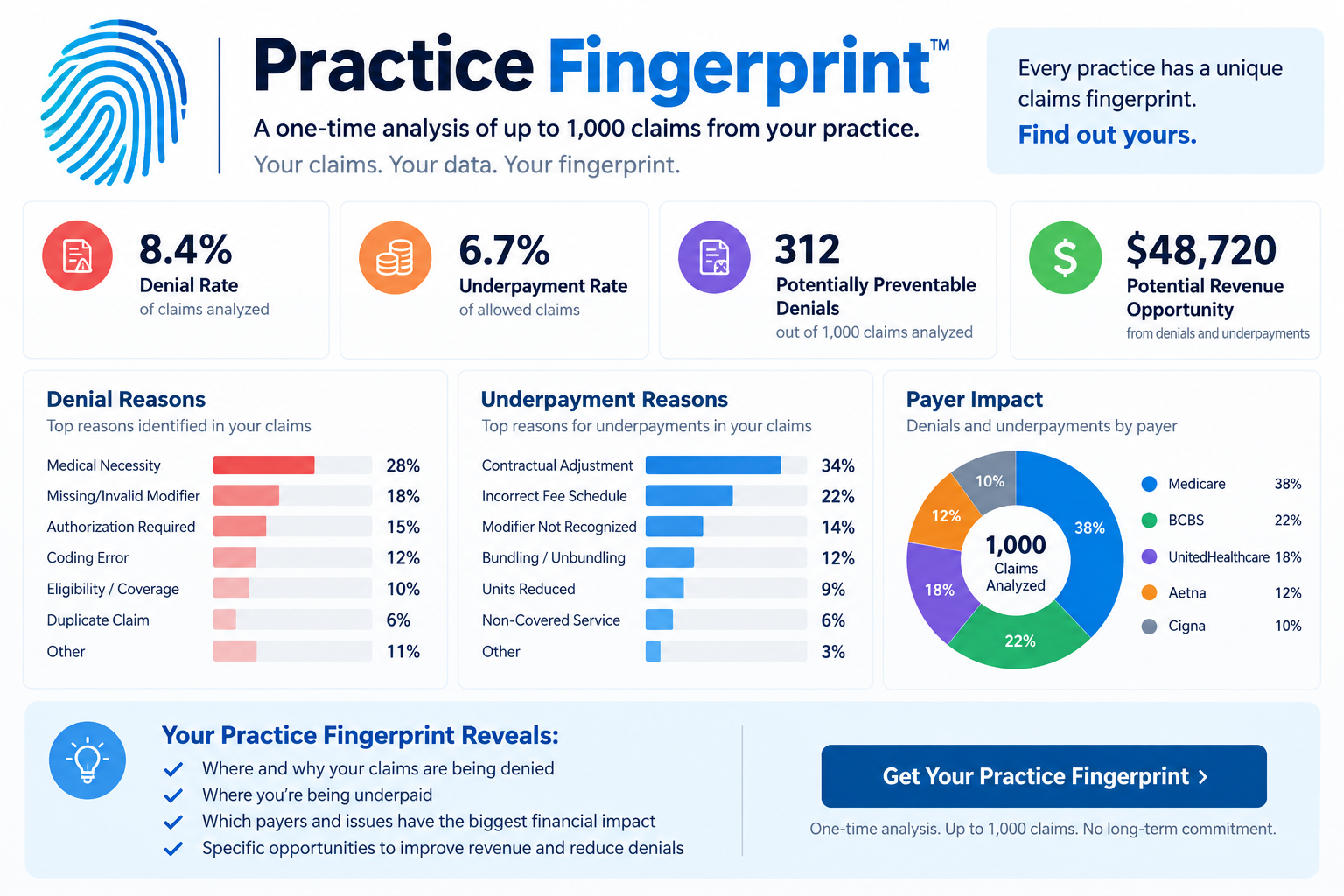
One-time purchase
No subscription, no auto-charge unless you opt in
HIPAA-protected
Same BAA + security controls as full ClaimsRevenue
$99 credit on upgrade
Full credit toward first month if you later subscribe
What you get
A single comprehensive report built from your actual ERA data.
Headline summary
Claims analyzed, dollars billed, denied, and recoverable at a glance.
The 5 things we'd fix first
Prioritized by dollar impact, with plain-English recommendations.
Payer analysis
Top payers, denial rate per payer, and underpayment flags.
CPT + modifier patterns
Which procedure codes and modifier combinations are driving your denials.
Rendering provider patterns
Denial rate per rendering NPI, with industry benchmark overlay.
CARC / RARC distribution
The top adjustment and remittance reason codes with dollar totals.
Suspicious underpayments
Service lines paid below the allowed amount, grouped by payer and CPT.
Industry benchmark overlay
How your rates compare to peer practices in your specialty.
Your Fingerprint signature
The unique recurring tuples that make your claims shape yours.
Downloadable PDF
Shareable with your billing team, CPA, or consultant.
Email the report
Send to up to 5 recipients inside your practice.
Fingerprint shows what happened. ClaimsRevenue prevents what's next.
Claims Fingerprint is the diagnosis. Full ClaimsRevenue is the prevention. When you upgrade, your Fingerprint data becomes the Day-1 baseline for continuous denial prevention.
Claims Fingerprint™
$99 one-time
- Up to 1,000 claims
- 30-day access
- Read-only analysis
- Downloadable + shareable PDF
- Comparison to peer practices
Full ClaimsRevenue
From $99 / month
- Continuous ERA analysis + prevention
- Claims validation before submission
- Denial workflow + appeals support
- Full roster + patient management
- $99 Fingerprint credit on first month
Frequently asked questions
What is a Claims Fingerprint?
Your Claims Fingerprint is the unique pattern hidden in your historical claims: your payers, procedures, providers, denials, adjustments, payment behavior, and recurring revenue-cycle issues. Every practice has one; most never see theirs.
What do I need to run the analysis?
One or more 835 ERA files exported from your EMR or clearinghouse. Most systems can export this directly. If you're not sure how, your clearinghouse support team can walk you through it.
How many claims can I analyze?
Up to 1,000 claims, cumulative across multiple uploads. If a single ERA pushes you over the limit, we'll analyze the first portion and show you what was excluded.
How long do I have access?
30 days from purchase. You can renew for another 30-day window + 1,000 claims at any time. Auto-renew is available if you want ongoing analysis.
Can I share the report?
Yes. Download the PDF or email it directly from the dashboard to up to 5 recipients (billing team, CPA, consultant). The PDF is designed to be print-friendly and shareable.
Is my data secure?
Yes. Claims Fingerprint uses the same security controls as full ClaimsRevenue: HIPAA Business Associate Agreement, encrypted-at-rest storage, HIPAA-grade access logging, and SES-encrypted email. See our Security page for details.
What happens to my data after 30 days?
Access to the analyzer pauses when your window closes. Your underlying data is retained per our Privacy Policy. Upgrading to full ClaimsRevenue restores access and preserves your Fingerprint as your Day-1 baseline for ongoing denial prevention.
What if I decide to subscribe?
If you upgrade to full ClaimsRevenue within 30 days of your most recent Claims Fingerprint payment (initial or renewal), the full $99 is credited toward your first month.
What's the difference between Claims Fingerprint and full ClaimsRevenue?
Claims Fingerprint diagnoses the past (one-time ERA analysis). Full ClaimsRevenue prevents denials on future claims before they're submitted and handles the ongoing workflow (validation, denials queue, appeals, patient billing).
Can I renew without upgrading?
Yes. You can renew Claims Fingerprint for another $99 / 30-day window as often as you like. Or opt into auto-renew to keep ongoing access without needing to click.
How do I get my 835 file from my clearinghouse?
If you cannot find a raw 835 file inside your EHR or practice management system, your clearinghouse is often the easiest place to get it. The specific steps depend on which clearinghouse you use (Availity, Claim.MD, Office Ally, Optum / Change Healthcare, Waystar, TriZetto, Experian Health / ClaimSource). See the clearinghouse-specific FAQs below.
How do I download an 835 from Availity?
Log in to Availity Essentials. Open the Send and Receive Files application. Select your organization. Open the ReceiveFiles folder. Locate the ERA/835 files you want. Select the Download icon for each file. Availity identifies Electronic Remittance Advice files as 835 files. If you do not see ERAs, confirm that your practice is enrolled to receive ERA transactions through Availity.
How do I download an 835 from Claim.MD?
Log in to Claim.MD. Open View ERA. Select the checkbox next to one or more ERAs. Open Select Action. Choose Download Selected 835. Claim.MD downloads the original ERA in X12 format, commonly with a .x12 extension. That is the file you want for Claims Fingerprint.
How do I download an 835 from Office Ally?
Log in to Office Ally. Select Download EOB/ERA 835. Select the date containing the ERA files you need, or change the report mode to Monthly. Locate the ERA. Click VIEW in the Download/View column. Office Ally downloads a ZIP file. Extract it. The ZIP normally contains a .835 file (the original ANSI 835) and a .TXT file (a human-readable version). For Claims Fingerprint, use the .835 file.
How do I get an 835 from Optum or Change Healthcare?
If your remittances are available through Optum Pay, 835 files can be downloaded through the portal. For practices with the Payment Data Files feature: Open Payment Data Files. Create a data bundle. Select 835 as the file type. Choose the settlement dates you want. Choose the applicable payer or payers. Create the bundle. When processing is complete, return to Payment Data Files. Select Download Data Bundle. Optum also supports individual downloadable 835 files depending on your portal configuration and access level.
How do I get an 835 from Waystar?
Open your Waystar remittance or Remit Manager workflow and locate the payer payment or ERA you want to analyze, then download the associated 835 remittance file. Some Waystar configurations automatically deliver 835 files directly to your practice management system or an SFTP mailbox. If you can see the ERA but cannot download the native file, contact Waystar support and request: 'The original X12 835 file associated with this remittance.' Do not request only the human-readable EOB.
How do I get an 835 from TriZetto?
TriZetto frequently integrates directly with the practice management system, so the exact workflow varies by software configuration. Open your TriZetto remittance or Send/Receive area and locate the electronic remittance files. The downloaded remittance may use a filename or extension determined by your practice management integration, but the underlying transaction should be an X12 835. If you cannot locate a download option, contact TriZetto Provider Solutions and request: 'The original EDI X12 835 remittance files for our TIN/NPI and requested date range.'
How do I get an 835 from Experian Health / ClaimSource?
Experian Health supports ERA/835 transactions through products including ClaimSource and eCare Online. Log in to your ClaimSource or eCare environment and locate the electronic remittance transactions. If your account only displays a human-readable remittance and you cannot locate the original EDI download, open an Experian Health support case and request: 'The native ANSI X12 835 ERA files for our practice.' Make clear that you need the original EDI transaction rather than a PDF remittance report.
I can't find my clearinghouse. What should I do?
Ask whoever handles billing for your practice this simple question: 'Where do our electronic remittance advice, or ERA/835 files, come from?' Your billing manager, EHR vendor or billing service should be able to identify the clearinghouse. Once you know the clearinghouse, look for terms such as ERA, Electronic Remittance, 835, Remittance Files, Receive Files, or EDI Files.
I found a PDF EOB. Is that what I need?
No. A PDF Explanation of Benefits or printable remittance contains information from the 835, but it is not the original X12 transaction. For Claims Fingerprint, look for the raw 835/ERA file.
I downloaded a TXT file. Is that okay?
Possibly. Some systems, including Tebra/Kareo, save the original ANSI X12 835 as a .txt file. Open the file with a basic text editor. If you see structured X12 data beginning with segments such as ISA*..., GS*..., ST*835..., you likely have the raw 835 transaction. Do not convert the file to Excel, Word or PDF.
How many 835 files should I get?
There is no required number of files. One 835 can contain multiple patient claims, while another may contain only a few. Collect enough recent 835 files to give Claims Fingerprint a representative sample of your practice's claims, up to 1,000 claims. For most practices, using multiple remittance files will provide a much stronger picture than analyzing a single payment.
Discover your Claims Fingerprint™ today
$99 one-time. Up to 1,000 claims. 30 days of access. No subscription required.
Get Started $99