Medical practices
Independent physicians, physician groups, nurse practitioners, physician assistants

ClaimsRevenue™ analyzes your practice's claims, insurance payments and denial history to identify recurring problems and help catch similar issues before future claims are submitted.
New AI billing analyst grounded in your own ERA history. Opt-in, PHI-scrubbed, zero data used for training.
Think of ClaimsRevenue as TurboTax® for medical claims.
Reduce Denials. Increase Revenue.
*One-time $99 ERA analysis of up to 1,000 claims. Full $99 credited toward your first month if you later subscribe.

TurboTax® didn’t simplify the tax code. It made a complex system easier for individuals and small businesses to navigate without becoming tax experts.
ClaimsRevenue takes the same approach to the medical claims process — helping practices improve claim quality without requiring clinicians or office staff to become billing experts.
TurboTax® is a registered trademark of Intuit Inc. ClaimsRevenue is not affiliated with, endorsed by, or sponsored by Intuit.
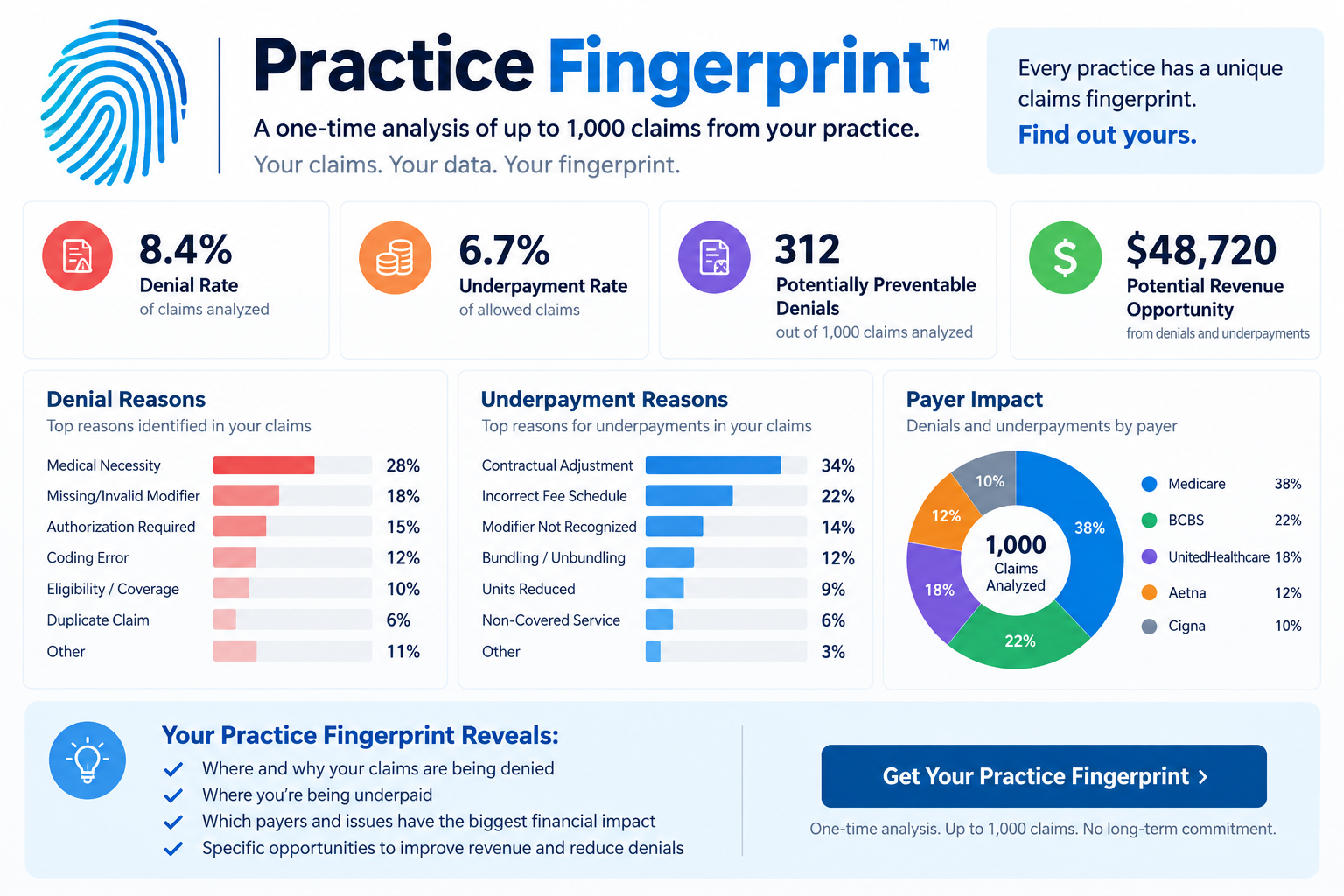
Upload your ERA. We'll analyze up to 1,000 claims and show you the patterns driving your denials, adjustments, and revenue leakage. No subscription required.
The industry math on denials is unforgiving. Every rejected claim is real dollars, real staff time, real delays in collecting revenue you already earned.
Based on published MGMA, Optum, and Premier industry benchmarks. Individual practice results vary.
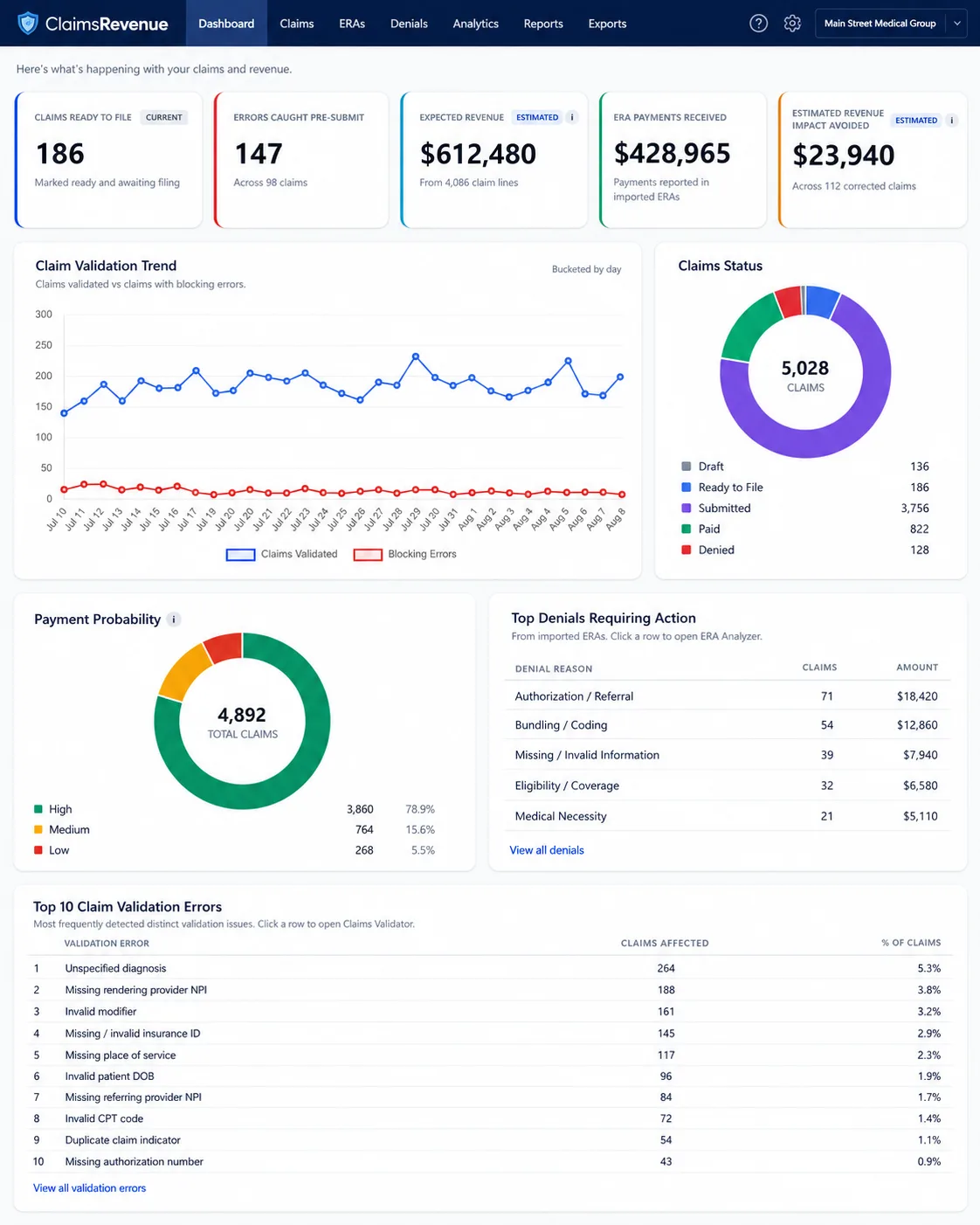
ClaimsRevenue™ helps move the work upstream, finding supported claim problems before submission instead of discovering them after a denial.
Identify supported claim errors before submission.
Turn payer responses into actionable revenue intelligence.
See recurring problems, denials, expected revenue, and estimated revenue impact.
ClaimsRevenue AI reads your practice's own ERA history to explain why a specific claim is at risk, suggest what to review before you submit, and surface legitimate payment-boost opportunities you can act on today. Not a generic model. Every answer cites a hit rate from YOUR own denials.
The AI only sees your own fingerprint plus the claim in front of you. Not trained on other practices. Not reading from a generic knowledge base.
Off by default on every account. The practice owner sets a monthly spending cap in Account Settings. $0.10 per Ask AI question. $0.50 for Revenue Max deep analysis, and only when material improvements are found.
Patient-identifiable data is scrubbed before any AI use. We never use identifiable patient or claim data to train AI models.



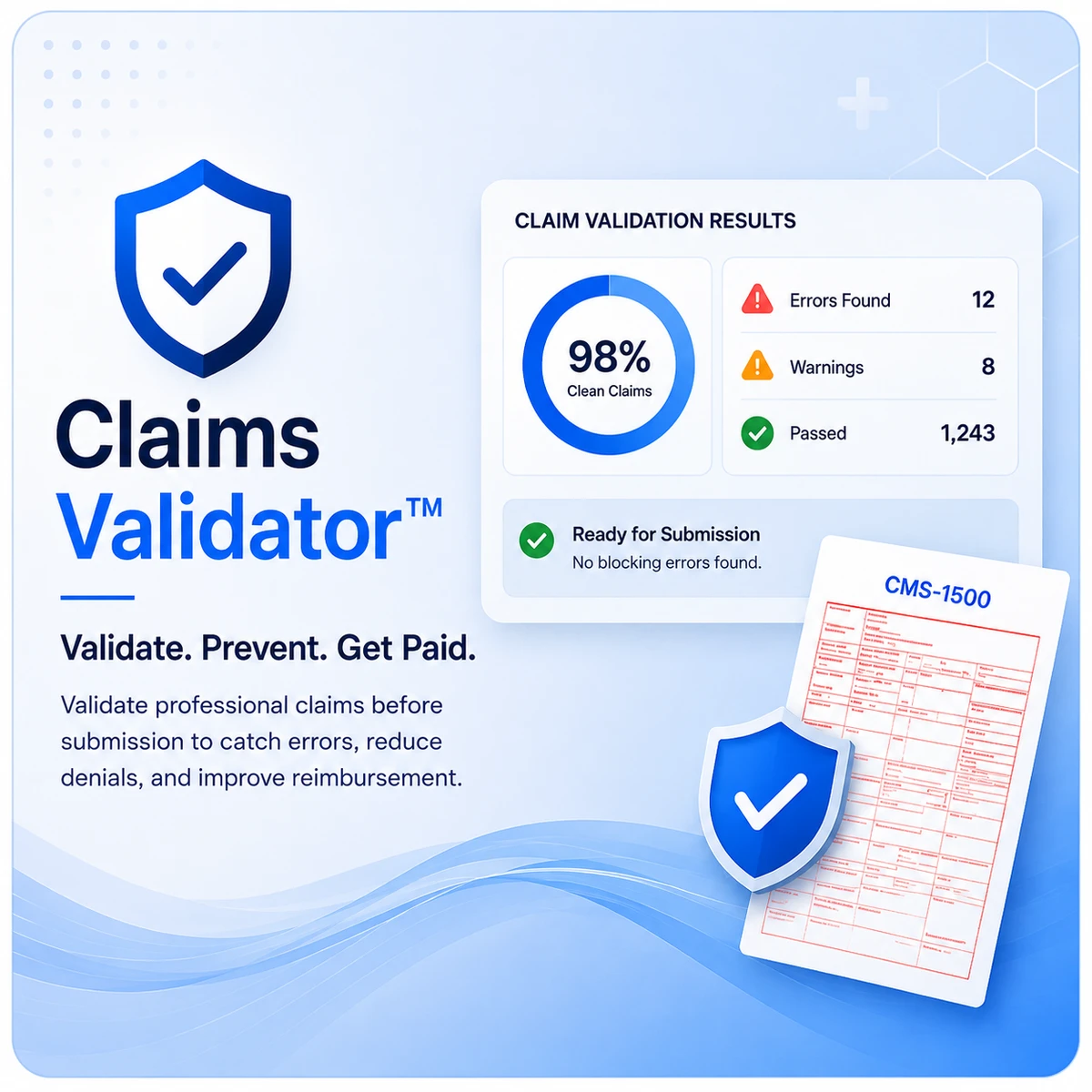
Validate professional claims before submission with structured checks that help identify missing, inconsistent, or high-risk information before a claim leaves the practice.
AI Ask AI explains any validator finding using your own denial history. $0.10 per question. Off by default.
Learn more about Claims Validator™ →
*One-time $99 ERA analysis of up to 1,000 claims. Full $99 credited toward your first month if you later subscribe.
Transform Electronic Remittance Advice into clear payment, adjustment, denial, and payer-performance insights so your practice can act faster and recover more of the revenue it has earned.
AI Revenue Max scans drafts for legitimate billing improvements grounded in your own ERA history. Pre-screen is free. Deep analysis is $0.50 and only runs when improvements look likely.
Learn more about ERA Analyzer™ →
*One-time $99 ERA analysis of up to 1,000 claims. Full $99 credited toward your first month if you later subscribe.
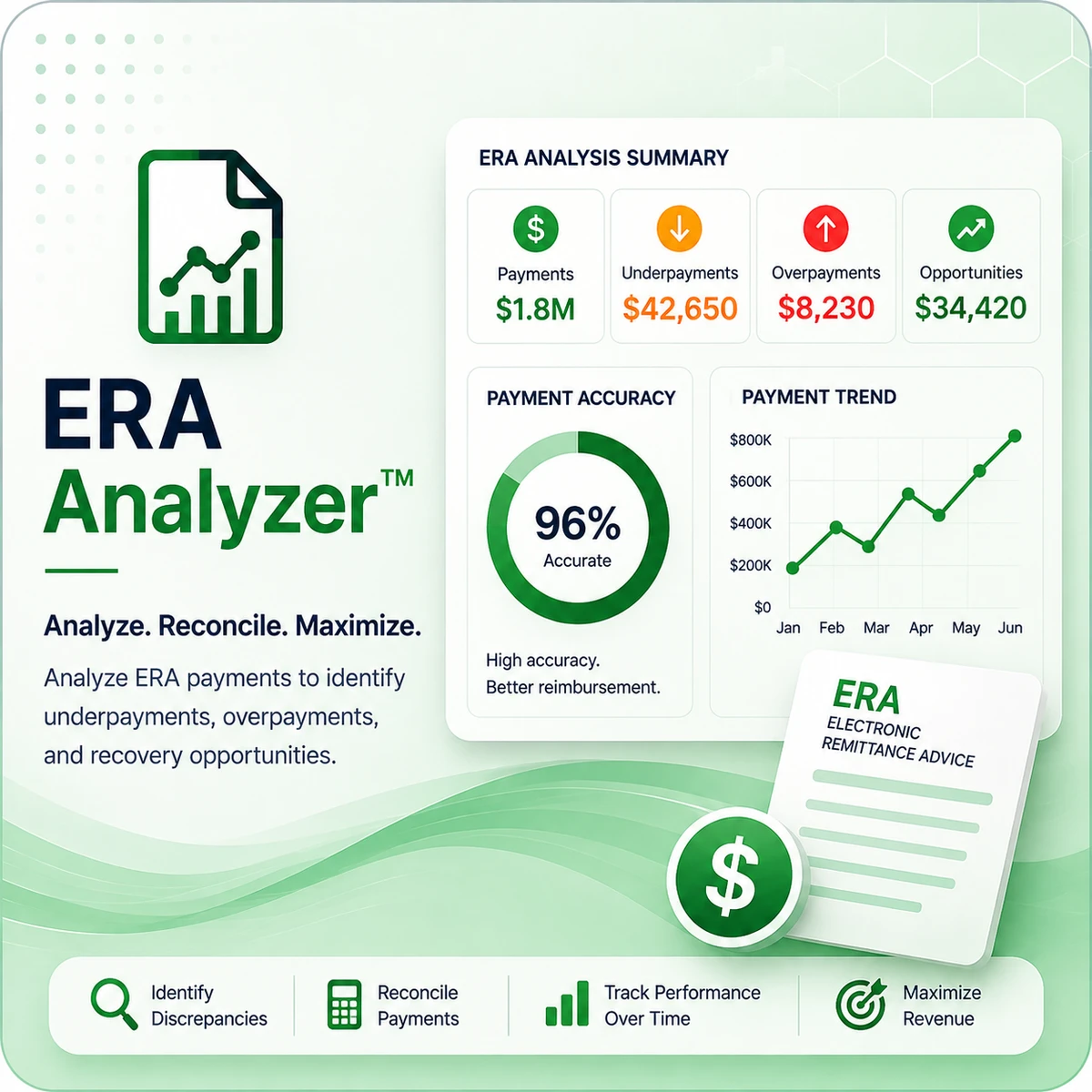
ClaimsRevenue™ is designed for independent professional healthcare providers and practices that submit professional claims and receive ERA files.
Independent physicians, physician groups, nurse practitioners, physician assistants
Therapists and counselors, clinical psychology, and psychiatry practices
Physical therapy, occupational therapy, and speech-language pathology
Chiropractic, podiatry, optometry, and other independent professional healthcare practices
Browse all 66 specialty pages →
*One-time $99 ERA analysis of up to 1,000 claims. Full $99 credited toward your first month if you later subscribe.
Cleaner claims before submission. Clearer payment intelligence after adjudication.
Enter professional claim information through the guided workflow or prepare claim data for validation.
Review errors, warnings, passed checks, and items not evaluated before submission.
Export a HIPAA 837P file for an existing clearinghouse or use optional Claim.MD submission.*
Review remittance results, payments, adjustments, denial patterns, and reimbursement insights after adjudication.
Works with your existing clearinghouse. Customers may validate and export HIPAA 837P files for use with platforms such as Change Healthcare/Optum, Office Ally, Availity, Waystar, TriZetto, and others. *Claim.MD submission is optional.
*One-time $99 ERA analysis of up to 1,000 claims. Full $99 credited toward your first month if you later subscribe.
Built and operated to align with HIPAA Privacy and Security requirements.
All infrastructure, personnel, and subprocessors are in the United States. PHI never leaves U.S. servers.
Application data is encrypted while stored on our infrastructure.
All connections use HTTPS with modern TLS.
Monday–Friday, 9:00 AM – 8:00 PM Eastern Time.
Patient-identifiable data is scrubbed before any AI use. We never use identifiable patient or claim data to train AI models.

All plans include the same product features. Pricing scales with active rendering providers.
*One-time $99 ERA analysis of up to 1,000 claims. Full $99 credited toward your first month if you later subscribe.
1 provider
2–10 providers
11–25 providers
26–50 providers
51–100 providers
More than 100 providers? and we'll set up the right plan.
AI is a usage-based add-on, not a bundled feature. Opt in by setting a monthly spending ceiling in Account Settings. Ask AI costs $0.10 per question. Revenue Max deep analysis costs $0.50, and only when the free pre-screen says material improvements are likely.
Unlimited claim submissions filed through integrated Claim.MD. Flat rate per TIN, no per-claim charges.
Real-time insurance eligibility verification via clearinghouse APIs. Pay only for what you use.
Mandatory AMA royalty for use of CPT® content under the Provider Health Analytics Model license. Charged at provider-add and annually on your practice anniversary. Cost-recovery pass-through, no markup, non-refundable per AMA license terms.
Ask AI why a specific claim shows denial-risk patterns. Grounded in your practice's own ERA history, not a generic model. Every answer cites a hit rate from your actual claims. Off by default; practice owner opts in by setting a monthly spending ceiling in Account Settings. $0.10 is charged on every Ask AI question. Billed monthly on the 1st.
AI reviews your draft and recommends legitimate billing improvements grounded in payer-specific patterns from your own ERA history. The free pre-screen runs first; the $0.50 deep analysis only runs when the pre-screen determines material improvements are likely. CMS-1500 / 837P only. Monthly ceiling and opt-in match AI Denial Insight. You never pay when the pre-screen finds no material improvements.
Stripe's standard card processing fee, passed through at cost on each invoice.
Click a section to expand its questions.
For the best experience, we recommend using the latest version of Google Chrome on a desktop or laptop computer with a reliable high-speed internet connection. ClaimsRevenue™ is a data-intensive application designed to display detailed professional claim information, validation results, ERA data, and revenue analytics.
While you may be able to access ClaimsRevenue™ from a phone or small-screen device, Claims Validator™ and ERA Analyzer™ are not designed for mobile use. These tools contain wide tables, numerous data elements, and detailed claim and remittance information that cannot be presented effectively on a small screen. For accurate review and efficient use of the platform, a desktop or laptop computer is strongly recommended.
If you cannot find a raw 835 file inside your EHR or practice management system, your clearinghouse is often the easiest place to get it. The specific steps depend on which clearinghouse you use (Availity, Claim.MD, Office Ally, Optum / Change Healthcare, Waystar, TriZetto, Experian Health / ClaimSource). See the clearinghouse-specific FAQs below.
Availity identifies Electronic Remittance Advice files as 835 files. If you do not see ERAs, confirm that your practice is enrolled to receive ERA transactions through Availity.
Claim.MD downloads the original ERA in X12 format, commonly with a .x12 extension. That is the file you want for Claims Fingerprint.
The ZIP normally contains a .835 file (the original ANSI 835) and a .TXT file (a human-readable version). For Claims Fingerprint, use the .835 file.
If your remittances are available through Optum Pay, 835 files can be downloaded through the portal.
For practices with the Payment Data Files feature:
Optum also supports individual downloadable 835 files depending on your portal configuration and access level.
Open your Waystar remittance or Remit Manager workflow and locate the payer payment or ERA you want to analyze, then download the associated 835 remittance file.
Some Waystar configurations automatically deliver 835 files directly to your practice management system or an SFTP mailbox. If you can see the ERA but cannot download the native file, contact Waystar support and request: "The original X12 835 file associated with this remittance." Do not request only the human-readable EOB.
TriZetto frequently integrates directly with the practice management system, so the exact workflow varies by software configuration.
Open your TriZetto remittance or Send/Receive area and locate the electronic remittance files. The downloaded remittance may use a filename or extension determined by your practice management integration, but the underlying transaction should be an X12 835.
If you cannot locate a download option, contact TriZetto Provider Solutions and request: "The original EDI X12 835 remittance files for our TIN/NPI and requested date range."
Experian Health supports ERA/835 transactions through products including ClaimSource and eCare Online.
Log in to your ClaimSource or eCare environment and locate the electronic remittance transactions. If your account only displays a human-readable remittance and you cannot locate the original EDI download, open an Experian Health support case and request: "The native ANSI X12 835 ERA files for our practice." Make clear that you need the original EDI transaction rather than a PDF remittance report.
Ask whoever handles billing for your practice this simple question: "Where do our electronic remittance advice, or ERA/835 files, come from?"
Your billing manager, EHR vendor or billing service should be able to identify the clearinghouse. Once you know the clearinghouse, look for terms such as ERA, Electronic Remittance, 835, Remittance Files, Receive Files, or EDI Files.
No. A PDF Explanation of Benefits or printable remittance contains information from the 835, but it is not the original X12 transaction. For Claims Fingerprint, look for the raw 835/ERA file.
Possibly. Some systems, including Tebra/Kareo, save the original ANSI X12 835 as a .txt file. Open the file with a basic text editor. If you see structured X12 data beginning with segments such as ISA*..., GS*..., ST*835..., you likely have the raw 835 transaction. Do not convert the file to Excel, Word or PDF.
There is no required number of files. One 835 can contain multiple patient claims, while another may contain only a few.
Collect enough recent 835 files to give Claims Fingerprint a representative sample of your practice's claims, up to 1,000 claims. For most practices, using multiple remittance files will provide a much stronger picture than analyzing a single payment.
ClaimsRevenue AI is scoped to the claim in front of you and your practice's own ERA history. It is not a general-purpose chatbot. Every answer references a hit rate from YOUR actual denials for the specific payer, CPT, modifiers, and rendering provider on that claim. It will not opine on medical necessity, give legal or clinical advice, or recommend specific code changes.
Patient-identifiable data is scrubbed before any AI use, and no identifiable patient or claim data is used to train AI models.
Ask AI is charged $0.10 every time you submit a question. There is no waiver.
Revenue Max is only charged $0.50 when the free pre-screen determines a deep analysis is warranted and the deep analysis runs. If the pre-screen finds no material improvements likely, Revenue Max does not run a deep analysis and you are not charged.
AI is off by default on every account. The practice owner sets a monthly spending ceiling in Account Settings. $0 ceiling disables AI entirely. All charges roll up into one monthly invoice on the 1st of the following month alongside eligibility checks and the AMA CPT® royalty.
ClaimsRevenue™ is designed to support healthcare customers in workflows involving protected health information and enters into a Business Associate Agreement with covered customers. Customers remain responsible for their own HIPAA obligations and for using the platform in accordance with the BAA and Terms.
For more information, customers can review the U.S. Department of Health and Human Services HIPAA overview, which explains the Privacy, Security, and Breach Notification Rules.
Not at this time unless ClaimsRevenue LLC expressly authorizes that use in writing. 42 C.F.R. Part 2 is a federal confidentiality law that provides additional protections for certain substance use disorder treatment records. Customers are responsible for determining whether they are a Part 2 program or whether information they intend to submit is subject to Part 2. If you are unsure, contact us through live chat before submitting the information.
For more information, customers can review the U.S. Department of Health and Human Services overview of 42 C.F.R. Part 2, which explains the confidentiality protections for substance use disorder patient records. The full current regulation is also available in the federal Electronic Code of Federal Regulations, 42 C.F.R. Part 2.
*One-time $99 ERA analysis of up to 1,000 claims. Full $99 credited toward your first month if you later subscribe.
Bring pre-submission validation and post-payment revenue intelligence into one focused workflow for your practice.
*One-time $99 ERA analysis of up to 1,000 claims. Full $99 credited toward your first month if you later subscribe.